Introduction
Choosing the right content management system is no longer a simple decision. Businesses today publish content across websites, mobile apps, dashboards, kiosks, and even IoT devices. That’s why the headless CMS vs traditional CMS debate has become one of the most important decisions for developers, SaaS founders, and digital teams.
If you’re unsure whether to use a traditional CMS like WordPress or move to a headless architecture, you’re not alone. Each option has different strengths, costs, levels of flexibility, and long‑term scalability implications.
For Learn About: Build a Website With AI in One Day, Click Here!
In this guide, you’ll learn:
- The difference between headless and traditional CMS
- Headless CMS vs traditional CMS features comparison
- Cost of headless CMS vs traditional CMS
- Real-world use cases and examples
- Which CMS is best for SEO, performance, and scalability
- How to choose the right option for your business
This guide is written from a practical SEO and development perspective to help you make the right decision for 2026 and beyond.
Need Help With Your Migration?
I help businesses migrate websites without traffic loss and with SEO growth.
What is a Traditional CMS?
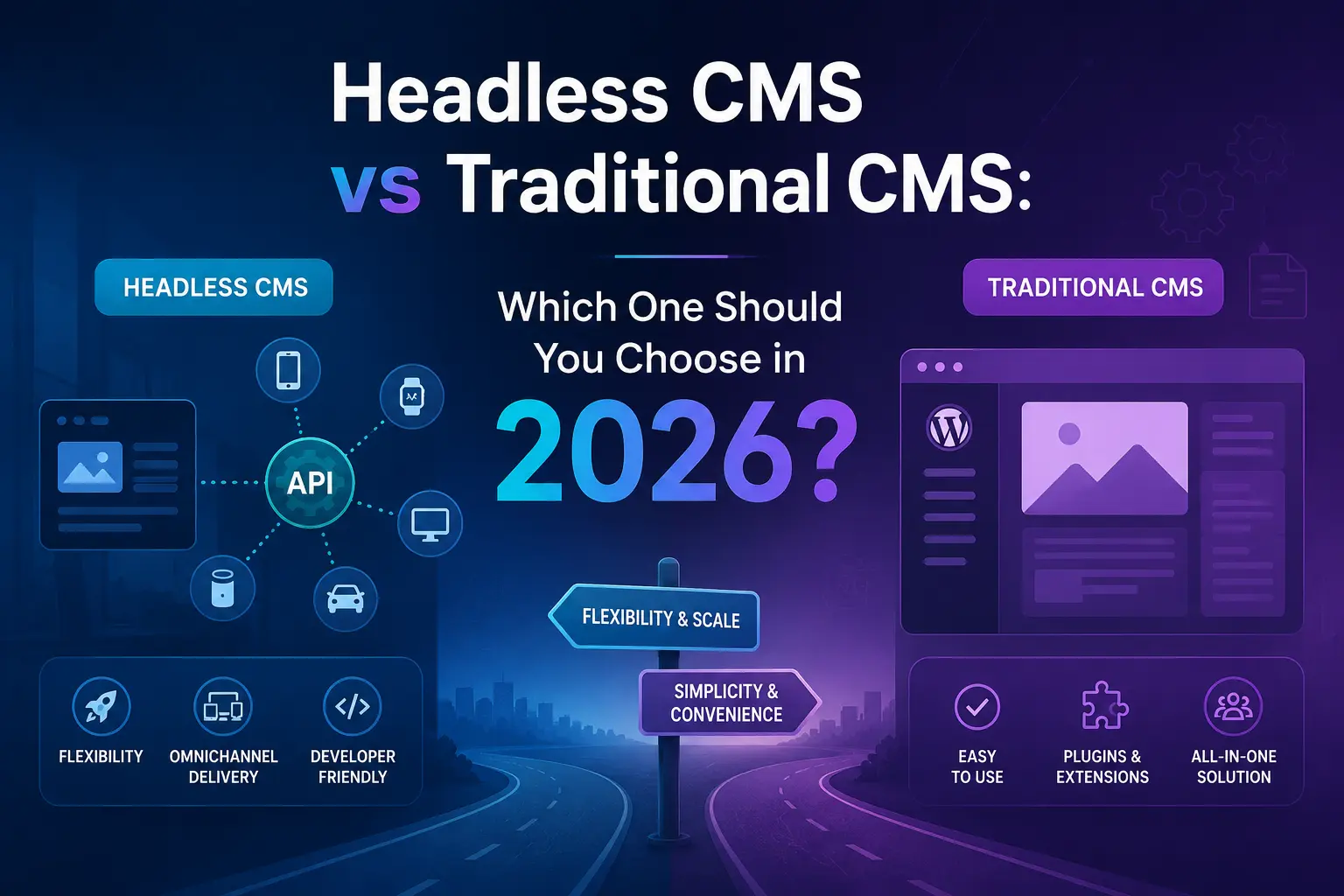
A traditional CMS is a monolithic system in which the backend (content management) and frontend (presentation layer) are tightly coupled. This means content is created, stored, and displayed within the same system.
Examples include:
- WordPress
- Joomla
- Drupal (traditional mode)
- Magento (monolithic)
For Learn About: Ecommerce Website Integration with ERP, Click Here!
How Traditional CMS Works
Content → Database → Theme/Templates → Website
The CMS controls everything from content editing to design rendering.
Traditional CMS Features
- Built‑in frontend themes
- Plugin ecosystem
- Visual editor
- SEO plugins
- Simple deployment
- Low technical barrier
- All‑in‑one architecture
Pros of Traditional CMS
- Easy to set up
- Faster performance
- Omnichannel publishing
- Better scalability
- Future-proof architecture
- Improved security
Cons of Traditional CMS
- Limited flexibility
- Performance limitations
- Difficult multi-platform delivery
- Security vulnerabilities (plugins)
- Harder scaling for large applications
For Learn About: CMS vs Framework, Click Here!
What is a Headless CMS?
A headless CMS separates the backend content management from the frontend presentation layer. Content is delivered via APIs instead of templates.
This means developers can build frontend using:
- React
- Next.js
- Vue
- Angular
- Mobile apps
- Smart devices
How Headless CMS Works
Content → API → Frontend (Website/App)
The CMS only manages content. The frontend is fully customizable.
Headless CMS Features
- API-first architecture
- Multi-channel content delivery
- Frontend flexibility
- Better performance
- Developer-friendly
- Scalable architecture
- Modern frameworks support
Pros of Headless CMS
- Maximum flexibility
- Faster performance
- Omnichannel publishing
- Better scalability
- Future-proof architecture
- Improved security
Cons of Headless CMS
- Higher development cost
- Requires developers
- No built-in frontend
- Longer setup time
- Complex workflow for beginners
For Learn About: How to Plan a Website Rebuild, Click Here!
Headless CMS vs Traditional CMS: Key Differences
| Feature | Traditional CMS | Headless CMS |
|---|---|---|
| Architecture | Monolithic | Decoupled |
| Frontend | Built-in | Custom |
| Flexibility | Limited | Very high |
| Performance | Moderate | High |
| SEO Control | Plugin-based | Full control |
| Scalability | Limited | Excellent |
| Multi-platform | Difficult | Easy |
| Development Cost | Lower | Higher |
| Maintenance | Easier | Requires dev team |
| Security | Plugin dependent | Stronger |
Traditional CMS vs Headless CMS: SEO Comparison
One of the most common questions is which CMS is better for SEO.
Traditional CMS SEO
Pros:
- SEO plugins available
- Easy meta management
- Beginner friendly
- Fast publishing
Cons:
- Slower page speed
- Plugin conflicts
- Limited technical SEO control
Headless CMS SEO
Pros:
- Full technical SEO control
- Better Core Web Vitals
- Faster performance
- Custom structured data
Cons:
- Requires SEO knowledge
- Manual setup needed
Verdict: Headless CMS provides better long-term SEO performance, but traditional CMS is easier for beginners.
Headless CMS vs Traditional CMS Features Comparison
| Feature | Headless CMS | Traditional CMS |
|---|---|---|
| API Delivery | Yes | Limited |
| Visual Editor | Limited | Yes |
| Theme Support | No | Yes |
| Performance | High | Medium |
| Omnichannel | Yes | No |
| Custom UI | Full | Limited |
| Developer Control | High | Medium |
| Time to Launch | Slower | Faster |
Cost of Headless CMS vs Traditional CMS
Understanding cost is critical when comparing headless cms vs traditional cms.
Traditional CMS Cost
Typical cost includes:
- Hosting: $10–$50/month
- Theme: $0–$100
- Plugins: $50–$300
- Development: $500–$3000
Total: Low to medium budget
Total: Low to medium budget
Headless CMS Cost
Typical cost includes:
- CMS subscription: $50–$500/month
- Frontend development: $2000–$10000
- API infrastructure
- Dev maintenance
Total: Medium to high budget
Verdict: Traditional CMS is cheaper initially. Headless CMS is better long-term investment.
When to Choose Traditional CMS
Choose traditional CMS if:
- You need a blog or a small business website
- You want a fast launch
- You have a limited budget
- Non-technical team
- Simple content structure
Best for:
- Bloggers
- Small businesses
- Marketing websites
- Landing pages
When to Choose Headless CMS
Choose headless CMS if:
- You need high performance
- Multi-platform publishing
- SaaS product
- Large website
- Complex architecture
- Custom frontend
Best for:
- SaaS platforms
- Enterprise apps
- Mobile apps
- Ecommerce platforms
- High traffic sites
- High traffic sites
Real World Example
Example 1: Marketing Website
A startup launching a blog and landing pages should use a traditional CMS. It’s faster and cheaper.
Example 2: SaaS Platform
A SaaS product delivering content to a web app, dashboard, and mobile app should use a headless CMS.
Example 3: E-commerce Platform
Large e-commerce with multiple storefronts benefits from headless CMS.
Need CMS Architecture for SaaS?
I help SaaS companies choose between headless vs traditional CMS based on SEO, scalability, and performance.
Difference Between Headless and Traditional CMS (Simple Explanation)
Traditional CMS = Backend + Frontend Together
Headless CMS = Backend Only + API + Custom Frontend
This is the simplest way to understand the difference between headless and traditional cms.
Performance Comparison
Headless CMS usually wins in performance because:
- Static generation
- CDN delivery
- API caching
- Modern frameworks
Traditional CMS relies on:
- Server rendering
- Database calls
- Plugin overhead
Security Comparison
Traditional CMS risks:
- Plugin vulnerabilities
- Theme issues
- Database exposure
Headless CMS benefits:
- Decoupled frontend
- Reduced attack surface
- API security
Scalability Comparison
Traditional CMS scaling is harder because the frontend and backend are connected.
Headless CMS scales easily using:
- CDN
- API scaling
- Microservices
- Serverless architecture
Headless CMS vs Traditional CMS: Which is Better?
There is no universal winner.
Choose Traditional CMS if you want simplicity. Choose Headless CMS if you want scalability and performance.
Best decision depends on:
- Budget
- Team size
- Project complexity
- Growth plan
- SEO requirements
For Learn About: Migrate from WordPress to Headless CMS Cost, Click Here!
FAQ – Headless CMS vs Traditional CMS
Headless CMS is better for scalability, performance, and multi-platform delivery. Traditional CMS is better for beginners and smaller websites.
Headless CMS offers better technical SEO control, but traditional CMS is easier to manage using plugins.
Yes, headless CMS typically costs more due to frontend development and infrastructure.
Startups should use headless CMS only if they need scalability. Otherwise, traditional CMS is sufficient.
Need Help Choosing Between Headless CMS vs Traditional CMS?
If you’re still unsure which CMS architecture is right for your project, I can help analyze your requirements and recommend the best option.
✔ SaaS CMS architecture ✔ SEO optimized CMS selection ✔ Headless CMS setup ✔ Traditional CMS optimization
Conclusion
The headless cms vs traditional cms decision depends on your project goals, budget, and long-term scalability needs. Traditional CMS is perfect for simple websites and fast launches, while headless CMS is ideal for high-performance, multi-platform digital experiences.
If you want flexibility, scalability, and future-proof architecture, headless CMS is the better choice. If you want simplicity and lower cost, traditional CMS remains a strong option.
Choose based on your growth plan, not just your current needs.
For Learn About: Convert WordPress to React, Click Here!