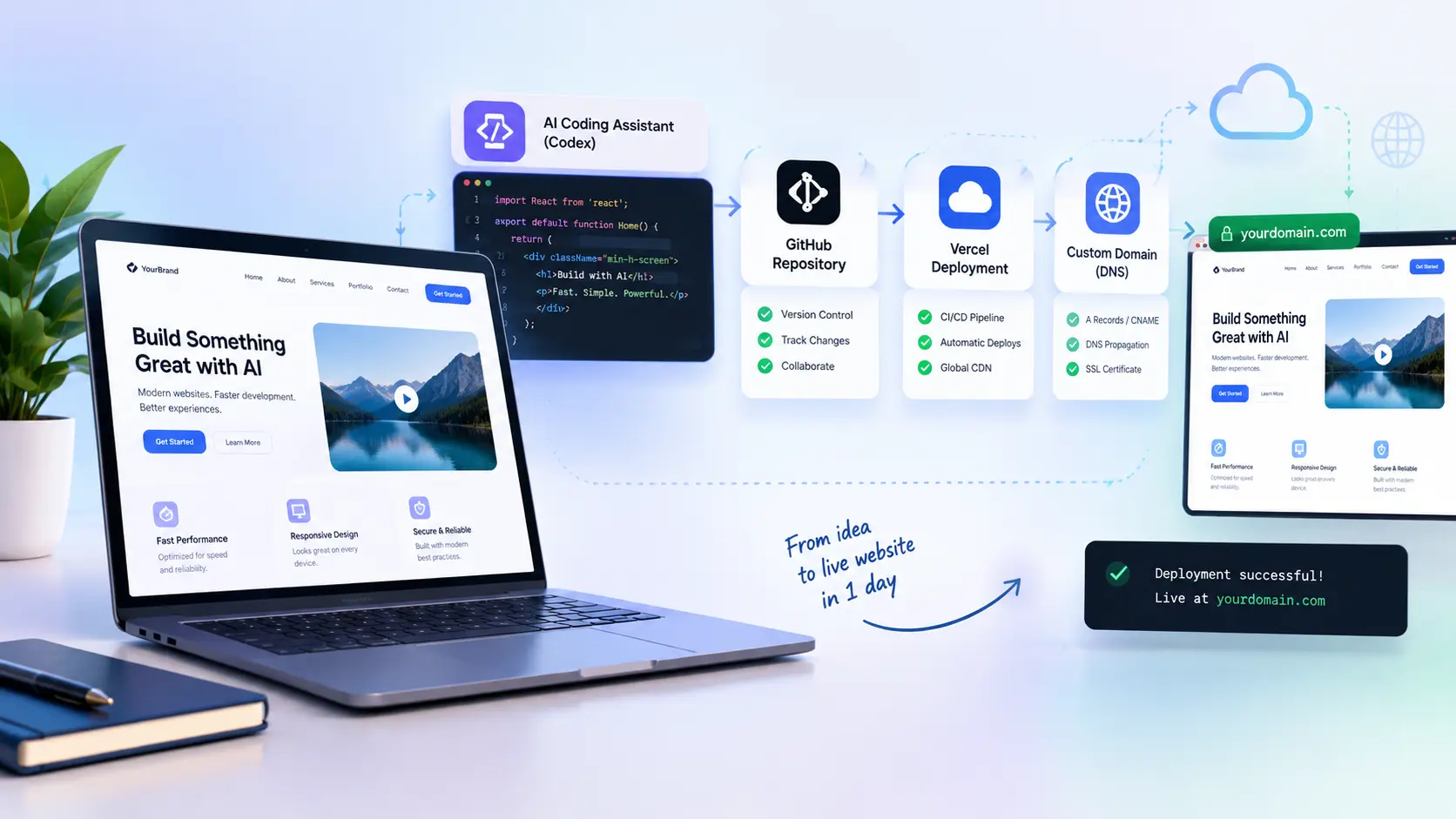
Stop Wasting Weeks: Make a Website in 1 Day!
If you’ve ever tried to build a website the old way, sketching wireframes, hand-coding layouts, wrestling with hosting panels, you already know how painful it is.
The good news? That entire process has been compressed.
With the right AI-assisted workflow, you can go from blank canvas to a live, professional website in a single day. Not a rough prototype. Not a template slapped together. A real, deployable website built with clean code, proper hosting, and SEO baked in from the start.
This guide walks you through the exact workflow used to build AI websites for startups, SaaS products, service businesses, and MVP launches step by step, with the mistakes, the shortcuts, and the pro-level decisions explained along the way.
Learn About: Headless CMS vs WordPress
Need a Professional AI Website Built Fast?
Skip the learning curve entirely. Hire a certified expert on Upwork or Fiverr and get your site live faster.
Why 2026 Is the Best Time to Build an AI Website
AI didn’t replace developers. What it did is far more interesting it automated the slow parts.
The tasks that used to eat up a developer’s week:
- Generating initial UI layouts
- Writing boilerplate frontend code
- Structuring page components
- Setting up deployment pipelines
Those can now happen in hours, not days.
The real competitive edge isn’t just speed, it’s what speed unlocks. Businesses that launch faster can test product-market fit sooner, start collecting leads earlier, and iterate based on real data rather than assumptions.
Learn About: Migrate from WordPress to Headless CMS
That's why AI-assisted development has become the default approach for startups and indie founders who can't afford to waste time.
The 5-Step Production Workflow at a Glance
Here’s what the end-to-end process looks like before we break each step down:
| Step | Action | Time Investment |
|---|---|---|
| 1 | Design UI/UX using AI models | 2–4 hours |
| 2 | Connect GitHub to your local machine | 30 minutes |
| 3 | Push clean, production-ready code | 1 hour |
| 4 | Deploy via Vercel | 15 minutes |
| 5 | Connect custom domain via DNS | 30 min – 2 hours |
The steps themselves are straightforward. The difference between a website that works and one that doesn’t comes down to how each step is executed. That’s the focus of everything that follows.
Learn About: Convert WordPress to React
Step 1: Design Your UI/UX With AI Models
This is where the time savings are most dramatic.
Rather than opening a blank Figma file or staring at a code editor with no direction, AI design tools let you generate starting points instantly. In a single prompt session, you can get:
- Full landing page layouts
- Dashboard component structures
- Mobile-responsive grid frameworks
- SaaS UI concepts with navigation patterns
- CTA-focused page flows built for conversion
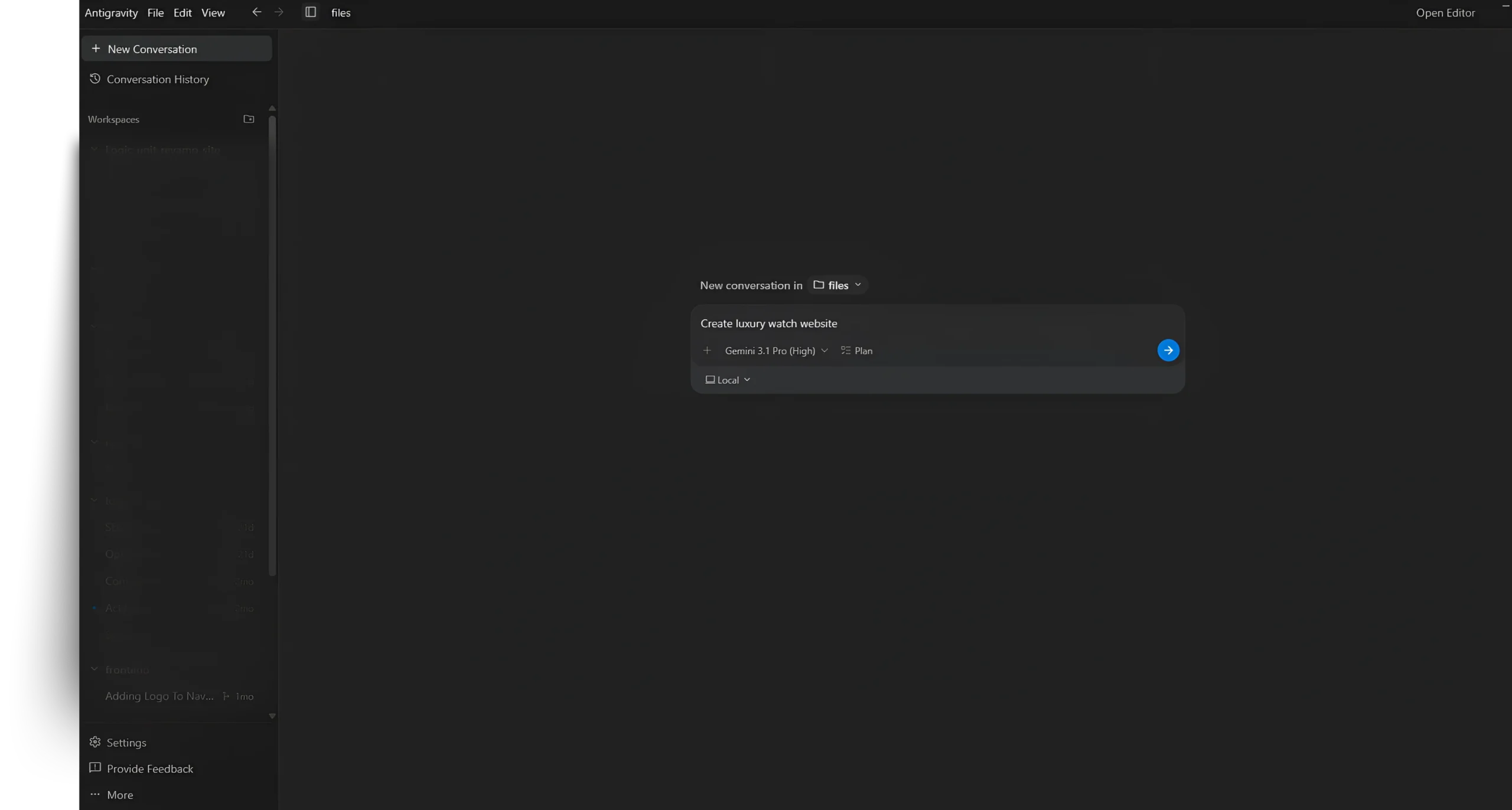
One effective approach is using Anti-Gravity AI models to generate initial UI/UX concepts, then refining the output manually for quality and performance.
The Mistake That Kills Most AI Websites
Shipping the raw AI output without reviewing it.
AI-generated designs often look impressive at first glance but contain real structural problems:
- Inconsistent spacing between sections
- Mobile layouts that collapse incorrectly
- CTAs placed in locations users ignore
- Typography choices that hurt readability
- Navigation structures that confuse visitors
The professional approach is to treat AI output as a first draft, not a final product. Use it to skip the blank-screen paralysis, then apply judgment to fix what the AI doesn't understand about user behavior.
What Separates a Professional AI Website From an Amateur One
Visitors make trust decisions in under 3 seconds. The elements that drive those decisions:
- Typography that’s easy to read at all sizes
- Consistent visual hierarchy across sections
- Clear, action-oriented CTAs above the fold
- White space used intentionally, not accidentally
- Fast load times that don’t punish mobile users
- Messaging that’s clear, not clever
Get these right, and the website does the selling. Get them wrong, and even the best product won’t convert.
Learn About: Migrating from Wix to Custom Website
Step 2: Connect GitHub to Your Machine
Version control isn’t optional; it’s infrastructure.
Before any code goes anywhere, connect your local development environment to GitHub. The two methods are:
- SSH: encrypted key-based authentication (recommended for production work).
- HTTP: username/token method, simpler to set up but less elegant for repeated use.
SSH is the professional standard. It’s more secure, eliminates repeated password prompts, and integrates cleanly with deployment workflows.
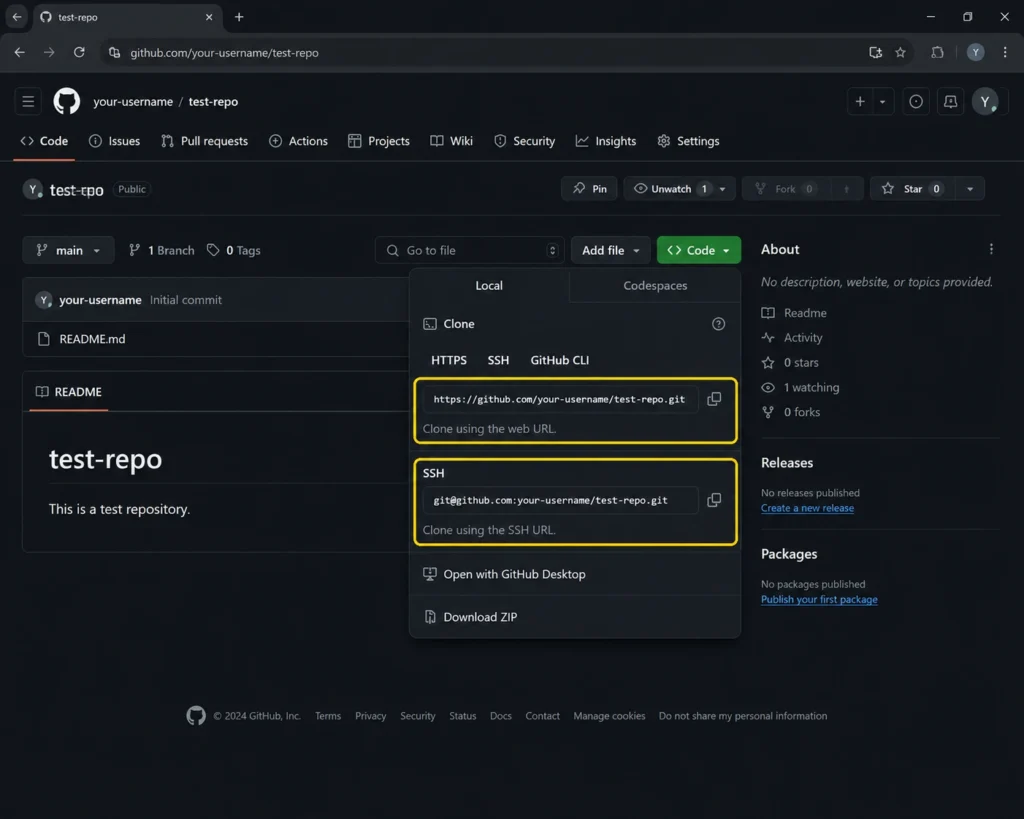
GitHub Does More Than Store Code
Developers who treat GitHub like a backup drive miss the point. Its real value is in the workflow it enables:
- Every change is tracked with a full history
- Rolling back a broken deployment takes seconds
- Multiple team members can collaborate without file conflicts
- Deployment platforms like Vercel hook directly into your repository
A project without proper version control is a project waiting to lose hours of work to a preventable mistake.
Repository Organization: A Habit That Pays Off
Clean repositories deploy cleanly. Messy repositories create deployment errors that are painful to diagnose.
Experienced developers always do the following before their first commit:
- Set up a logical folder structure that matches the project architecture
- Create a .gitignore file that excludes node_modules, build folders, and secret files
- Use descriptive, lowercase file and folder names
- Remove any test files or placeholder assets before the first push
Step 3: Push Your Code to GitHub
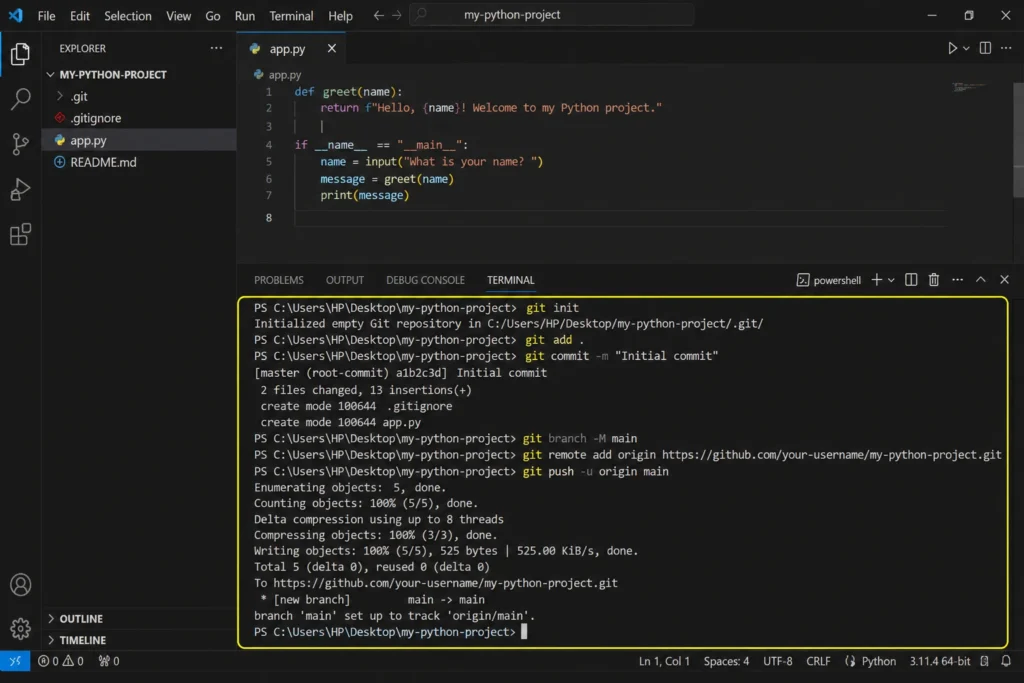
With GitHub connected and your repository set up correctly, pushing code is simple:
- Create a new repository
- Stage your project files
- Write a clear commit message
- Push to the main branch
That said, one mistake here can compromise everything you’ve built.
The .env File Rule Don’t Break This
Your .env file is where sensitive credentials live:
- API keys for AI services
- Database connection strings
- Private tokens and authentication secrets
- Payment gateway credentials
If this file gets pushed to a public repository, those credentials are exposed immediately. GitHub has bots that scan for exposed secrets within seconds of a push.
Add .env to your .gitignore file before your first commit. Non-negotiable.
git initgit add README.mdgit commit -m "first commit"git branch -M maingit remote add origin https://github.com/your_username/repo.gitgit push -u origin mainEnvironment Variables: The Professional Setup
Keeping credentials separate from code is a fundamental security practice. Modern deployment platforms, including Vercel, allow you to store environment variables directly in the platform’s dashboard.
This means your code repository stays clean and public-safe, while your secrets stay private and accessible only during deployment. The project becomes easier to collaborate on, easier to audit, and significantly harder to compromise.
Step 4: Deploy With Vercel
This is the step where the website goes from existing on your computer to existing on the internet.
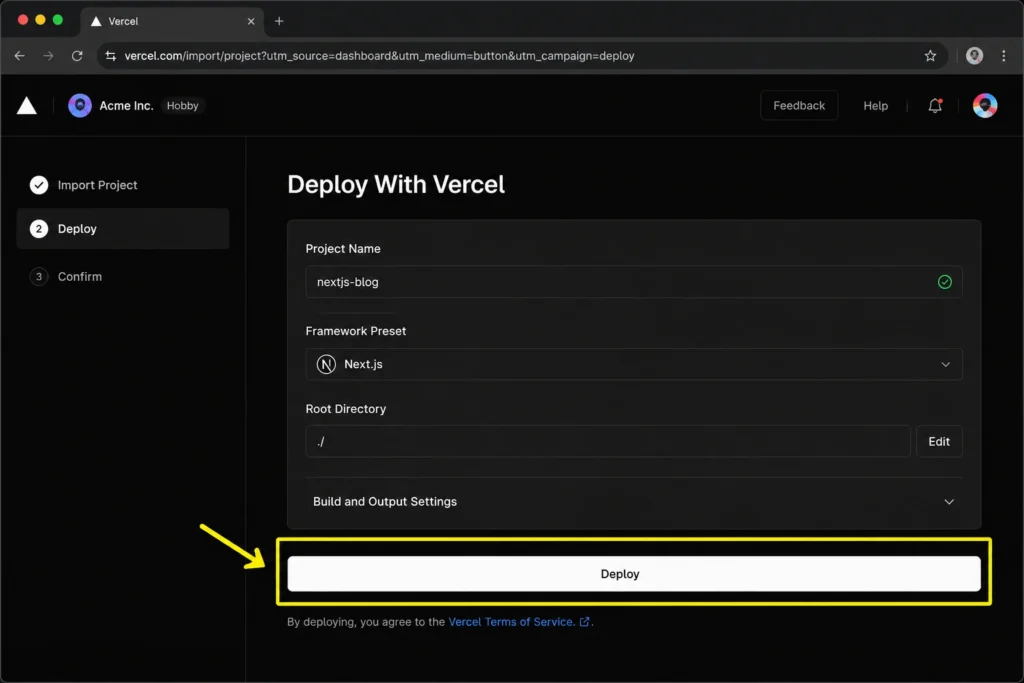
Vercel’s deployment process with GitHub is remarkably straightforward:
- Create a Vercel account and connect your GitHub
- Import your repository from the dashboard
- Add your environment variables
- Click deploy
Vercel handles everything else automatically: framework detection, dependency installation, build execution, and global distribution.
| Vercel Feature | Why It Matters for Your Website |
|---|---|
| One-click GitHub integration | Deploy by pushing code no manual steps |
| Global CDN distribution | Fast load times from anywhere in the world |
| Automatic SSL certificates | HTTPS security without configuration |
| Instant rollback on failure | Fix bad deployments without downtime |
| Branch preview deployments | Test changes before they go live |
Speed directly affects SEO. Google measures Core Web Vitals metrics like Largest Contentful Paint and First Input Delay as ranking signals. Vercel’s infrastructure is specifically optimized for the performance Google rewards.
Learn About: Headless CMS for Ecommerce
Always Test Mobile Before You Deploy
AI-generated layouts frequently break on small screens. The desktop version looks polished; the mobile version has overlapping text, too-small buttons to tap, and navigation menus that don’t function correctly.
Before pushing to production, manually test on mobile screen sizes:
- All buttons respond to touch correctly
- Text is readable without pinching or zooming
- Navigation opens and closes as expected
- Images scale proportionally and don’t overflow
- Forms are usable with a mobile keyboard
Step 5: Connect Your Domain Via DNS
The final step turns your Vercel-hosted URL into a branded, professional domain.
The process is consistent across most domain registrars:
- Add your custom domain inside the Vercel dashboard
- Copy the DNS records Vercel provides
- Paste those records into your domain registrar’s DNS settings
- Allow time for propagation (typically 15 minutes to a few hours)
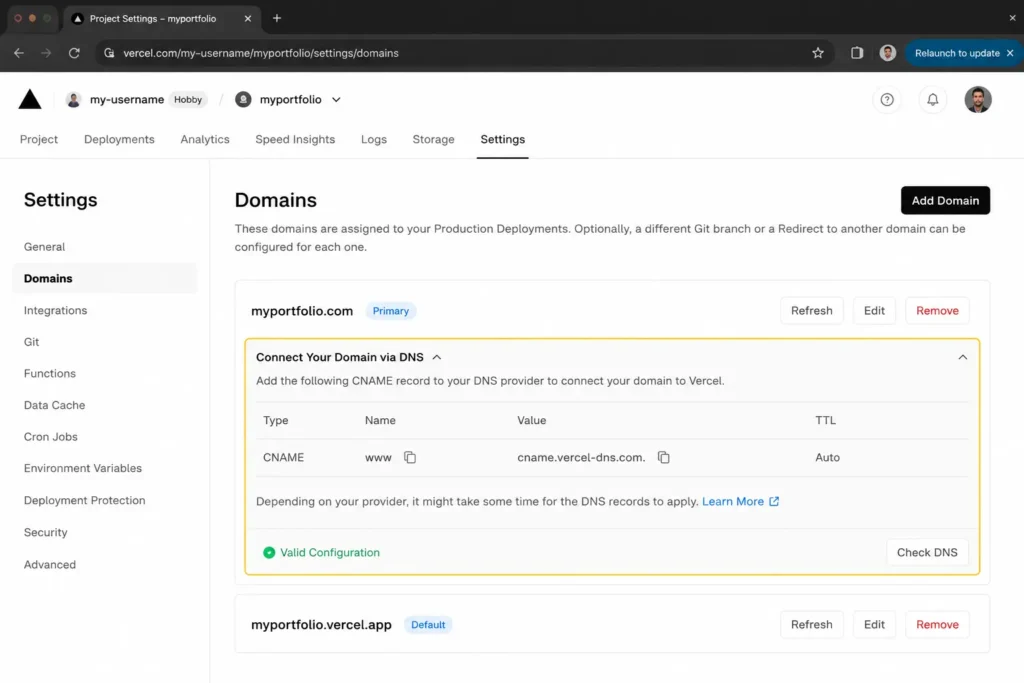
DNS propagation is not instant. If your domain doesn’t resolve immediately, that’s normal, not broken. Most setups resolve within an hour.
Common Problems and How to Actually Fix Them
Every developer hits these. Knowing how to diagnose them quickly is what separates professionals from beginners.
| Problem | Root Cause | Fix |
|---|---|---|
| Deployment fails | Build error or missing dependency | Read the full build log the error is always there |
| GitHub push rejected | Authentication or SSH key issue | Regenerate SSH key and re-add to GitHub settings |
| Mobile layout broken | Non-responsive CSS from AI generation | Test with browser dev tools, fix specific breakpoints |
| Slow page load | Unoptimized images or render-blocking JS | Compress images, lazy-load below-the-fold content |
| DNS not resolving | Propagation still in progress | Wait up to 48 hours; check with DNS lookup tools |
How to Make Your AI Website Rank on Google
Launching is only the beginning. Getting traffic requires deliberate SEO work and most AI-generated websites skip this entirely.
The most common reasons AI websites fail to rank:
- Generic content that doesn’t answer specific questions
- Thin pages with no real substance
- Poor UX that causes high bounce rates
- No internal linking structure
- Missing or weak metadata
1. Match Search Intent — Not Just Keywords
Google’s algorithm has evolved far beyond keyword matching. It reads intent.
Instead of asking “what keyword should I use,” ask: “what is the person actually trying to accomplish when they search this?” A page that genuinely solves that problem will outperform a page that just repeats a keyword phrase.
2. Write From Real Experience
Google’s Helpful Content system specifically rewards content that demonstrates first-hand expertise. Tutorials that include:
- Real workflows with specific decisions explained
- Honest descriptions of what went wrong
- Actual screenshots and examples
- Lessons that only come from doing the work
Perform significantly better than polished but hollow content that could have been written by anyone.
3. Format for AI Search Systems
AI-powered search features like Google’s AI Overviews prefer content that’s structured for quick extraction:
- Direct answers in the first paragraph of each section
- Tables for comparisons and structured data
- FAQ sections with precise questions and concise answers
- Clear heading hierarchy that mirrors how people think about a topic
4. Build Topical Authority Over Time
A single great article won’t dominate a topic. A cluster of related, interlinked articles will.
Build content around your core subject to strengthen your site’s relevance signal:
- AI agents for businesses
- Hiring AI developers correctly
- AI development costs and planning
The Thing Most Guides Won’t Tell You
AI tools are speed multipliers. That’s real and valuable.
But the websites that actually perform, convert visitors into leads, rank consistently on Google, and hold up under real traffic are built by people who haven’t outsourced their judgment to the AI.
The best AI website still needs someone who understands:
- Why users leave without converting
- What makes a CTA trustworthy vs. pushy
- How content hierarchy guides attention
- Why a slow homepage loses clients before they read a word
AI generates the structure. Human judgment makes it work.
FAQ: Building a Website With AI in One Day
Ans. Yes, with this workflow, a fully functional, deployed website is achievable in under 24 hours. The AI-assisted design phase, combined with Vercel’s automated deployment, removes most of the time-consuming manual work.
Ans. Vercel is the most commonly used platform for modern AI-powered websites. Its GitHub integration, global CDN, and framework auto-detection make it the fastest path from code to live site. It’s the go-to for Next.js, React, and most modern JavaScript frameworks.
Ans. A basic understanding of how web projects are structured is helpful. AI tools reduce the amount of manual coding significantly, but being able to review, modify, and troubleshoot AI-generated code will prevent you from being stuck when something doesn’t work as expected.
Ans. The most damaging mistakes are: accepting AI design output without reviewing it, uploading sensitive credential files (.env) to GitHub, not testing the mobile version before launch, and publishing generic content that doesn’t serve a specific user intent.
Ans. Vercel is specifically designed for the type of applications startups build: Next.js apps, React-based SaaS products, API-connected web apps, and marketing sites that need to load fast and scale. It’s also free to start, which matters for early-stage projects.
Ready to Launch Your AI Website?
Wrapping Up: Speed Is the Starting Line, Not the Finish Line
Building a website with AI in one day is genuinely achievable in 2026. The tools exist, the workflows are proven, and the infrastructure is accessible to anyone.
But the startups that get the best results from this approach aren’t the ones who shipped the fastest, they’re the ones who shipped thoughtfully. Who reviewed the AI output with a critical eye? Tested on mobile before going live? And wrote content that served a real reader, not just a keyword.
Use AI to compress the timeline. Use judgment to make it worth the effort. That’s the workflow. That’s what actually works.
Learn About: Website Infrastructure Costs