Can You Really Build a Website With AI in One Day?
Yes, if you’re building the right kind of website and follow a structured development process.
For a simple business website, landing page, portfolio, service website, or basic marketing site, AI-assisted development can dramatically shorten the time needed to go from an idea to a working website.
A practical workflow looks like this:
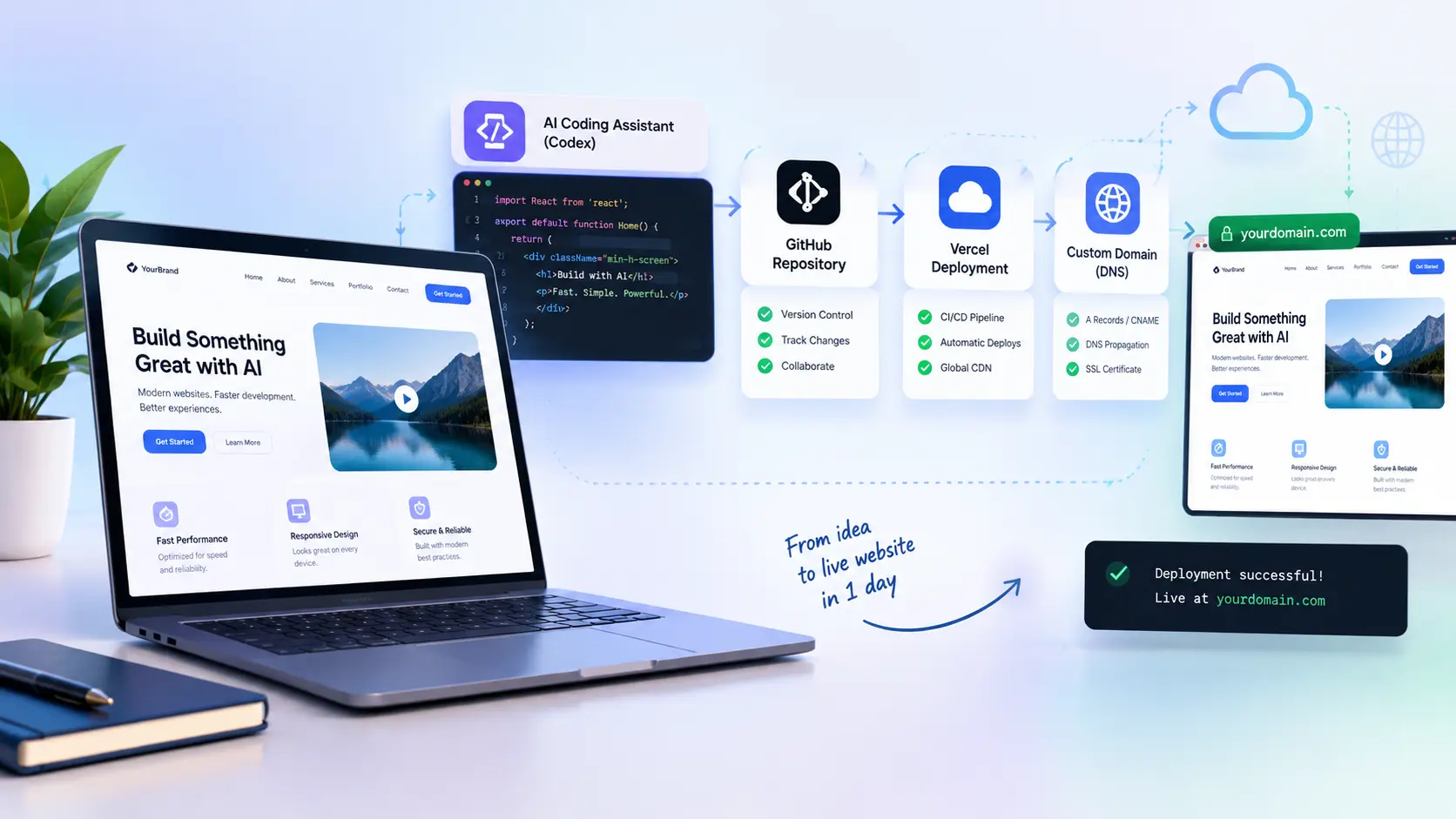
Plan → Generate with Codex → Test locally → GitHub → Vercel → DNS → Live website
But there is an important catch.
Getting AI to generate website code is not the same as getting a website ready for real customers.
The difficult part often begins after the first version works:
- The mobile layout breaks.
- The navigation behaves strangely.
- Forms don’t work.
- Images aren’t optimized.
- The Vercel build fails.
- Environment variables are missing.
- The website works locally but not in production.
- DNS doesn’t point to the correct deployment.
- The design looks good but doesn’t convert visitors.
- SEO fundamentals are missing.
That’s where experienced development becomes valuable.
If you’d rather have an experienced developer handle the technical work instead of spending hours debugging AI-generated code, you can
The 10-Step AI Website Workflow
| Step | Task | Outcome |
|---|---|---|
| 1 | Buy your domain | Branded web address |
| 2 | Collect design inspiration | Visual direction |
| 3 | Plan the architecture | Pages and user flows |
| 4 | Generate code with Codex | Initial website |
| 5 | Test locally | Working website |
| 6 | Create GitHub repository | Version control |
| 7 | Push the code | Remote project |
| 8 | Connect Vercel | Cloud deployment |
| 9 | Enable Git-based deployment | Repeatable updates |
| 10 | Configure DNS | Live custom domain |
Before You Start: Know What AI Can and Cannot Do
AI coding tools are extremely useful for generating and modifying software.
They can help with:
- Components
- Pages
- CSS
- JavaScript
- React/Next.js code
- Refactoring
- Debugging
- Documentation
- Feature implementation
- Repetitive development tasks
But AI doesn’t automatically understand your:
- Business goals
- Customers
- Brand positioning
- Conversion strategy
- Security requirements
- Production environment
- Existing infrastructure
- Domain configuration
- Long-term maintenance requirements
That’s why the most effective approach is usually:
Use AI to accelerate development not to remove the need for engineering judgment.
Step 1: Buy Your Domain
Your domain is the address customers use to reach your website.
For example:
yourcompany.com
Before buying it, check:
- Brand compatibility
- Spelling
- Memorability
- Availability
- Potential trademark confusion
- Whether customers can easily understand it
Keep ownership of the domain under your business account.
If you hire a developer, they can help configure it without needing to permanently control the asset.
Domain vs hosting vs DNS
These three terms are often confused.
- Domain: your website address.
- Hosting: where your website is deployed.
- DNS: the system that connects your domain to the appropriate destination.
Understanding this distinction becomes important later when you connect the site to Vercel.
Step 2: Gather Website Inspiration
Don’t start your AI coding session with:
“Make me a professional website.”
That’s too vague.
Instead, collect references.
Look for:
- Hero sections
- Navigation
- Typography
- Color combinations
- Cards
- Pricing layouts
- Contact sections
- Testimonials
- Mobile navigation
- CTA placement
- Footer layouts
You aren’t trying to copy another website.
You’re giving the AI a visual direction.
Create a simple design brief
For example:
Business:
AI web development agency

Audience:
Startup founders and small businesses

Style:
Modern, clean, premium and minimal

Pages:
Home
About
Services
Portfolio
Contact

Primary CTA:
Book a consultation

Requirements:
Responsive
Fast
Accessible
SEO-friendly
Mobile-first
The better your input, the less guessing the AI has to do.
Step 3: Plan the Website Architecture
Before generating code, decide what needs to exist.
For a service business:
Home
├── Hero
├── Problem
├── Services
├── Benefits
├── Portfolio
├── Testimonials
├── FAQ
└── CTA

About
Services
Portfolio
Contact
Then define the visitor journey.
For example:
Search
 ↓
Landing page
 ↓
Understand the problem
 ↓
See solution
 ↓
Build trust
 ↓
See proof
 ↓
CTA
 ↓
Contact / Hire
This is especially important if your goal is not just traffic, but leads. A website can receive visitors without generating clients. Your content and website architecture need to guide qualified visitors toward the next action.
Step 4: Generate the Website With Codex
Now you can begin implementation.
OpenAI’s documentation describes Codex as an AI coding agent that can assist with software engineering tasks.
Instead of asking it to generate everything at once, provide a structured specification.
Example Codex instruction
Build a responsive website for a professional web development service.

Target audience:
Business owners, startup founders and entrepreneurs.

Pages:
- Home
- Services
- Portfolio
- About
- Contact

Primary conversion goal:
Generate qualified project inquiries.

Requirements:
- Responsive design
- Mobile-first layout
- Accessible semantic HTML
- Strong visual hierarchy
- Reusable components
- SEO-friendly structure
- Fast loading
- Clear CTA sections
- Professional typography
- Conversion-focused page structure

Before coding:
1. Explain the architecture.
2. Identify reusable components.
3. Identify potential technical risks.

Then implement the project in manageable stages.
Why You Shouldn’t Ask AI to Build Everything at Once
A giant prompt can produce a giant codebase.
And giant codebases are harder to debug.
Instead:
Build the navigation.
Then:
Build the hero.
Then:
Build the services section.
Then:
Build the portfolio.
Then:
Build the contact flow.
Then:
Test responsiveness.
Then:
Fix errors.
Then:
Prepare production deployment.
This makes problems easier to isolate.
Step 5: Test the Website Locally
This is where many AI-generated websites go wrong.
They look impressive in the initial preview.
Then someone opens them on a phone.
Suddenly:
- Text overflows.
- Buttons overlap.
- Navigation breaks.
- Images become distorted.
- Sections become too tall.
- Animations cause problems.
Run the website locally.
For many JavaScript projects, that may involve:
npm install
npm run dev
The exact commands depend on your framework.
Then test:
- Desktop
- Tablet
- Mobile
- Navigation
- Buttons
- Forms
- Images
- Links
- Console errors
- Responsive breakpoints
- Loading states
This Is Where Many AI Website Projects Need a Developer
If your AI-generated website has reached the point where you’re thinking:
“I’ve spent three hours asking AI to fix the same problem.”
Stop.
That’s often a signal that you need someone to inspect the actual implementation.
Instead of repeatedly prompting an AI, an experienced developer can:
- Inspect the codebase
- Trace the error
- Fix the underlying issue
- Clean up duplicated code
- Repair responsive layouts
- Test the result
- Prepare the project for deployment
Hire me on Upwork for AI-assisted web development, debugging, website development, or deployment help. The project doesn’t necessarily need to be rebuilt from scratch. I can work with an existing AI-generated codebase when it is technically usable.
Step 6: Create Your GitHub Repository
Once the website works locally, create a GitHub repository.
GitHub provides a place to store the project’s source code and its version history.
For example:
my-business-websiteGitHub’s documentation explains how to create repositories and push local project changes to them.
Why use Git?
Because your website will change.
You want to know:
- What changed?
- When did it change?
- Who changed it?
- Can I restore an earlier version?
Version control gives you that history.
Step 7: Push the Website to GitHub
From the project directory:
git init
git add .
git commit -m "Initial website build"
git branch -M main
git remote add origin YOUR_REPOSITORY_URL
git push -u origin main
Then your architecture becomes:
Your computer
      ↓
     Git
      ↓
   GitHub
Never commit secrets
Do not put these into a public repository:
- API keys
- Passwords
- Private tokens
- Database credentials
- Authentication secrets
Use environment variables instead.
Step 8: Connect GitHub to Vercel
Now connect the repository to Vercel.
The general workflow is:
GitHub repository → Vercel project → Build → Deployment
The exact settings depend on your framework.
Check:
- Framework
- Build command
- Output configuration
- Environment variables
- Node version where relevant
- Production settings
Don’t blindly copy configuration from a random tutorial.
Step 9: Turn Your Git Workflow Into a Deployment Pipeline
Once your repository and deployment platform are connected, your workflow becomes much simpler.
Edit
 ↓
Git commit
 ↓
Git push
 ↓
GitHub
 ↓
Vercel build
 ↓
Deployment
 ↓
Live website
Instead of manually uploading website files every time, you have a repeatable development process. That becomes especially useful once your website starts receiving real traffic and needs regular updates.
Step 10: Connect Your Custom Domain
Your Vercel project can be deployed before your custom domain is connected.
Eventually, you’ll want:
yourcompany.com
instead of a temporary deployment address.
Add the domain inside your Vercel project.
Then configure the DNS records requested by Vercel.
The exact DNS values should come from your current Vercel project configuration rather than an old blog post.
Vercel’s current documentation covers custom domains, DNS configuration, and SSL/TLS troubleshooting.
A Record vs CNAME
This distinction matters.
A record
An A record points a hostname toward an IP address.
Domain
  ↓
IP address
CNAME
A CNAME points one hostname toward another hostname.
www.example.com
       ↓
another hostname
Your required configuration depends on your hosting and DNS setup.
Don’t add random DNS records just because you found them in a tutorial.
What If Your Domain Doesn’t Work Immediately?
Don’t panic.
Check:
- Domain spelling
- DNS provider
- Nameservers
- Record type
- Record value
- Conflicting records
- Vercel domain status
- SSL status
DNS changes may not appear everywhere immediately because DNS resolvers and caches can retain previous information.
If you’ve checked everything and still can’t get the domain working, this is another situation where professional assistance can save hours.
Don’t want to troubleshoot DNS yourself?
I can help with the website, deployment, and technical configuration.
The Complete AI Website Architecture
Think of the entire system like this:
                  AI / Codex
                       ↓
              Website Development
                       ↓
                  Local Testing
                       ↓
                     Git
                       ↓
                   GitHub
                       ↓
                   Vercel
                       ↓
                 Deployment
                       ↓
                    DNS
                       ↓
                Custom Domain
                       ↓
                Live Website
Every tool has a different job.
- Codex: assists with coding.
- Git: tracks changes.
- GitHub: stores the repository.
- Vercel: deploys the application.
- DNS: connects your domain.
AI-Generated Website vs Production Website
This is the most important distinction in the entire process.
AI-generated prototype
It may:
- Look excellent
- Demonstrate an idea
- Have functional pages
- Use modern components
- Work in a development environment
But a production website may need much more.
Production-ready website
A serious production website may require:
- Responsive testing
- Accessibility
- Security
- Performance optimization
- Error handling
- Form validation
- SEO
- Analytics
- API security
- Browser testing
- Environment configuration
- Image optimization
- Deployment testing
- Maintenance
That’s why:
AI-generated ≠ automatically production-ready.
When AI Is Enough and When You Should Hire a Developer
You may be perfectly comfortable building a simple landing page yourself.
But consider professional help when:
You need custom functionality
Examples:
- Customer dashboards
- Authentication
- Databases
- APIs
- AI integrations
- Payment systems
- Memberships
- SaaS functionality
Your AI-generated code won’t cooperate
If you keep fixing one problem only to create another, an experienced developer can review the architecture instead of treating symptoms one prompt at a time.
Your website is already making money
Once your website becomes important to sales, reliability becomes more valuable than simply getting something online.
You don’t want to manage the technical stack
Some business owners would rather spend their time on:
- Customers
- Marketing
- Sales
- Operations
- Product development
Rather than Git, DNS, build errors, and deployment logs.
That’s exactly where professional development support can make sense.
What I Can Help You With
If you arrived at this article because you want to build an AI-assisted website but don’t want to handle the technical work alone, I can help with the implementation.
My Upwork profile currently focuses on AI-powered web development, WordPress, Shopify, Next.js, and Headless CMS, and the profile shows Top Rated status, 100% Job Success, and a 4.9/5 rating from 21 reviews.
Services can include:
- AI Website Development: Turn an idea or AI-generated prototype into a functional website.
- Next.js Development: Build modern web applications and websites using Next.js.
- WordPress Development: Build, customize and improve WordPress websites.
- Shopify Development: Customize Shopify stores and implement required functionality.
- AI-Assisted Development: Work with AI-generated code while applying human technical review.
- Bug Fixing: Debug existing website code instead of unnecessarily rebuilding the project.
- Responsive Design Fixes: Repair layouts that don’t work properly on mobile, tablet or desktop.
- GitHub + Vercel Deployment: Set up repositories, deployments and production workflows.
- Custom Domain + DNS: Help connect the website to its real domain and troubleshoot configuration problems.
Don’t Start Over If You Already Have an AI-Generated Website
This is worth emphasizing.
If you’ve already used Codex, ChatGPT or another AI coding tool to build 50–80% of your website, you may not need to throw it away.
The existing project can potentially become the starting point for professional development.
A developer can inspect:
- Existing architecture
- Components
- Dependencies
- Styling
- API integrations
- Build configuration
- Responsive behavior
and determine what can be retained and what needs to change.
Already have AI-generated code?
A Simple Way to Decide
Ask yourself three questions:
1. Is the website simple?
If yes, you may be able to finish it yourself with AI.
2. Is something technically broken?
If yes, professional debugging may save significant time.
3. Is the website important to your business?
If yes, consider professional review before sending real customers to it.
What Should You Give a Developer?
If you decide to hire someone, prepare:
- Website requirements
- Page list
- Design references
- Existing code
- GitHub repository
- Framework
- API requirements
- Domain
- Hosting platform
- Deadline
- Examples of websites you like
The more complete the brief, the easier it is to start productive development.
Ready to Turn Your AI Website Into a Real Website?
You’ve now seen the complete process:
Plan
↓
Generate with AI
↓
Test
↓
GitHub
↓
Vercel
↓
DNS
↓
Production
If you’re comfortable handling every technical step yourself, use this guide as your roadmap.
But if you’re currently stuck with an AI-generated website, don’t spend another day repeatedly asking an AI to fix the same problem.
Get an experienced developer to finish the job.
I provide AI-assisted web development and technical implementation through Upwork, including website development, debugging, WordPress, Shopify, Next.js and deployment-related work. My current Upwork profile shows Top Rated status, 100% Job Success and a 4.9/5 rating from 21 reviews.
If you already have an AI-generated website, send the existing project instead of starting from zero.
Frequently Asked Questions
For a simple website, AI-assisted development can make a one-day build realistic. More complex applications involving authentication, databases, payments, APIs or custom business logic can require substantially more development and testing.
Codex can assist with substantial software-development tasks, but the output still needs to be reviewed and tested against your actual requirements.
Yes. A common workflow is to develop locally, store the project in GitHub, connect the repository to Vercel and configure the project’s deployment requirements.
Yes. Vercel supports custom domains. The DNS configuration depends on your domain and hosting setup, so use the current records shown in your Vercel project.
Common causes include missing environment variables, build configuration problems, dependency issues, incorrect paths or differences between your local and production environments.
First, reproduce the problem and identify the exact error. If repeated AI debugging isn’t resolving the issue, have a developer inspect the project directly.
Yes. If the existing architecture is usable, a developer can often work with the current codebase and fix, refactor or extend it.
Pricing depends on the scope, technology, existing code quality, integrations and required functionality. A simple website fix and a complete SaaS application are very different projects.
Final AI Website Launch Checklist
Planning
- Requirements defined
- Target audience identified
- Sitemap created
- CTA defined
- Design direction established
Development
- AI-generated code reviewed
- Components organized
- Responsive layout tested
- Accessibility considered
- Forms tested
- Errors fixed
GitHub
- Repository created
- Code committed
- Secrets excluded
- Remote configured
- Changes pushed
Vercel
- Repository connected
- Framework detected/configured
- Build succeeds
- Environment variables configured
- Production deployment verified
Domain
- Domain added
- DNS records configured
- Conflicting records checked
- SSL/HTTPS verified
- Root and
wwwbehavior tested
SEO
- Search intent satisfied
- Title optimized
- Meta description written
- H1 implemented
- H2/H3 structure logical
- Internal links added
- Images optimized
- Alt text reviewed
- Sitemap reviewed
- Robots configuration reviewed
- Structured data accurately implemented
Need a Developer to Finish It?
You don’t have to choose between building everything yourself and paying someone to start from zero. If AI has already generated your website, you can bring the existing work. I’ll help determine what can be kept, what needs fixing and what needs to be improved before deployment.
AI gives you speed. Professional development gives you the technical judgment to turn that speed into a website you can actually launch.