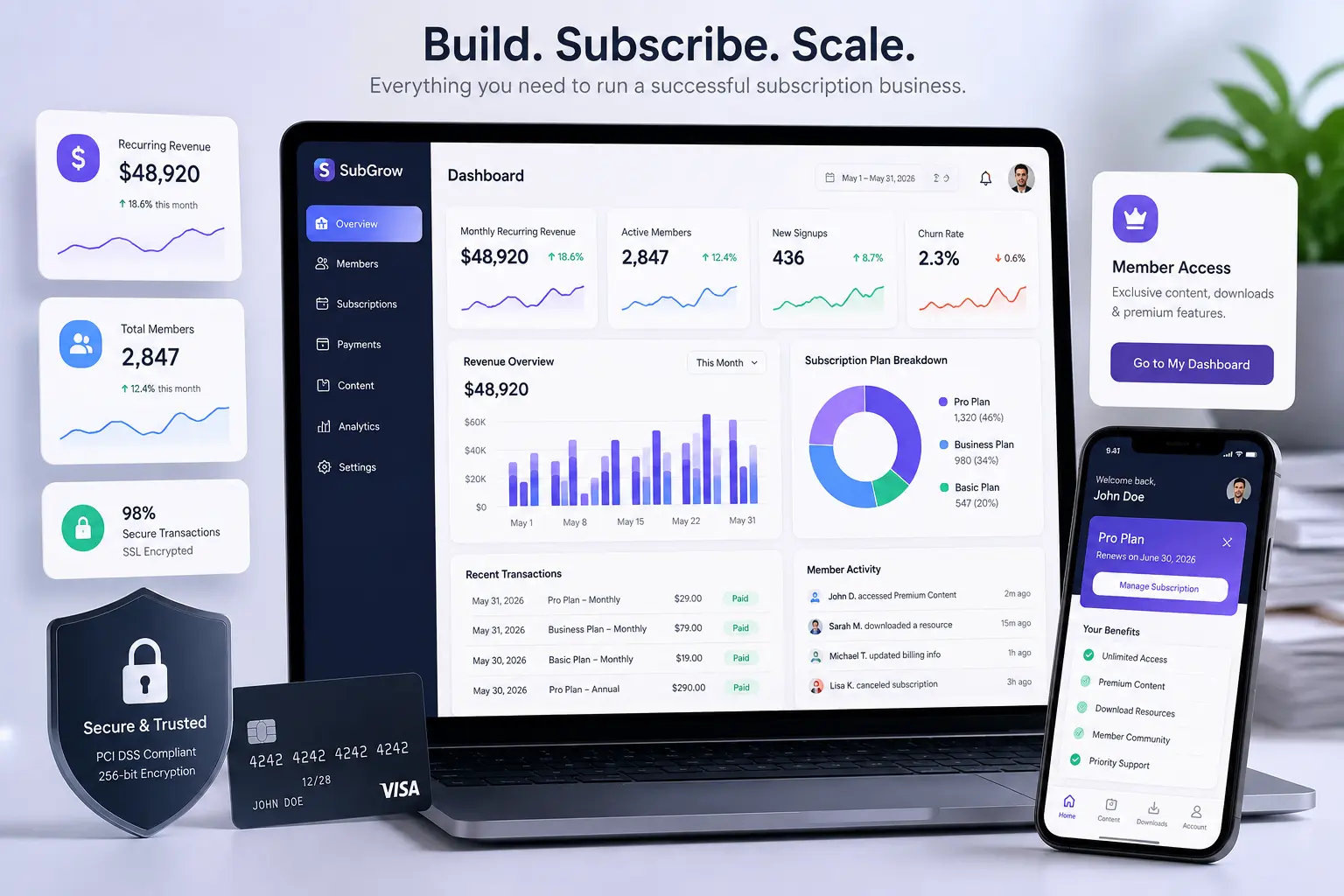
A subscription website can look simple from the outside: create an offer, add a payment button, and charge people every month. In practice, the difficult part is not collecting the first payment. It is building an experience valuable enough that people continue paying.
That difference matters. A recurring business depends on acquisition, activation, billing, access, customer support, and retention working together. Current guidance from Stripe also emphasizes choosing the right niche, pricing model, payment setup, and customer experience rather than treating subscriptions as a simple checkout feature.
Learn About: How to Plan a Website Rebuild
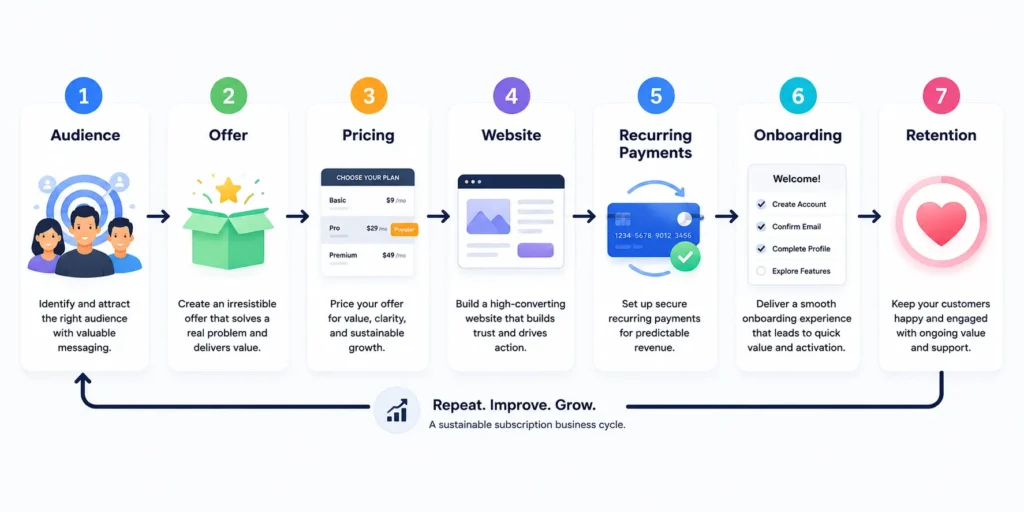
In this guide, you will learn how to build a subscription website from the ground up, choose the right model, structure pricing, set up recurring payments, protect member access, and design a retention system that can support long-term growth.
What Is a Subscription Website?
A subscription website is a site where customers pay on a recurring schedule, usually monthly or annually, to receive ongoing access to a valuable service. That value might be premium content, software, a community, professional services, digital resources, physical products, or a combination of these.
The core model has three parts: an ongoing value proposition, controlled access, and recurring billing. If any one of these is weak, the subscription can struggle.
Learn About: How to Build a Website That Converts Visitors Into Customers
Common subscription website models
| Model | What members pay for | Example |
| Content membership | Premium articles, videos, reports or templates | Industry research library |
| Community | Access to experts, peers and events | Private founder community |
| SaaS | Continued access to software features | Project management platform |
| Education | Courses, workshops and new learning material | Monthly training hub |
| Product subscription | Recurring delivery of physical goods | Specialty food box |
| Service subscription | Ongoing access to a defined service | Managed website care plan |
Need a Subscription Website Built?
If you have the idea and business model but do not want to spend months connecting membership plugins, payments, dashboards, and access rules, a freelance developer or development team can help define the architecture and build the first version. Your Upwork and Fiverr profiles can be positioned around “subscription website development,” “membership website development,” and “recurring payment integration” to capture readers with immediate implementation intent.
Step 1: Validate the Problem Before Choosing the Technology
The first question is not “Which platform should I use?” Ask: “Why would someone still pay after the first month?” A subscription only works when the value continues.
Start with a simple validation statement: “I help [specific audience] get [specific ongoing outcome] through [specific recurring value].”
For example, a generic “premium marketing community” is vague. “A weekly membership for independent SaaS founders that provides SEO experiments, templates, office hours, and competitor research” gives the buyer a clearer reason to stay.
- Identify a narrow audience with a recurring problem.
- Interview potential customers or analyze recurring questions from your existing audience.
- Define what changes or improves after joining.
- Decide what new value members receive every week or month.
- Test demand with a waitlist, pre-sale, or small founding-member launch.
Learn About: Headless CMS Development Cost in 2026
Step 2: Choose the Right Subscription Business Model
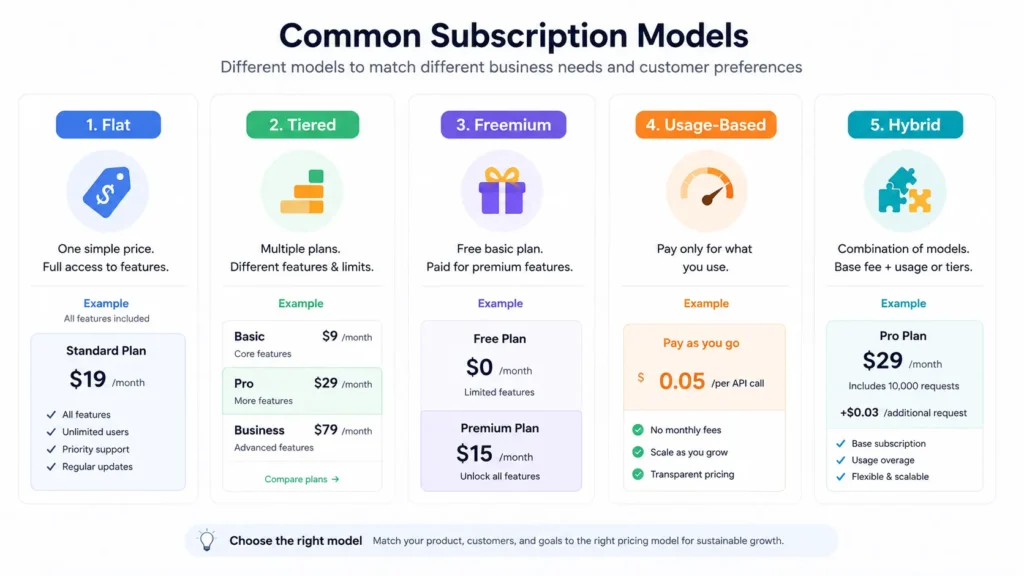
Do not copy another company’s pricing model simply because it works for them. Your model should match how customers receive value.
| Pricing approach | Best for | Watch out for |
| Flat monthly | Simple offers with one core audience | Can limit upselling |
| Annual membership | Stable products with proven value | Requires stronger upfront trust |
| Tiered pricing | Different customer needs or feature levels | Too many tiers create confusion |
| Freemium | Products with a strong upgrade path | Free users can become costly |
| Usage-based | Software tied to measurable consumption | Billing can feel unpredictable |
| Hybrid | Base subscription plus usage or add-ons | Needs clear communication |
For many new businesses, two or three plans are enough. A simple structure is Starter, Pro, and Business, with each tier answering a different need rather than merely hiding random features.
Step 3: Plan the Minimum Viable Subscription Website
Your first version does not need every feature. Build the smallest system that lets a visitor understand the offer, subscribe securely, receive the promised access, and manage their account.
| Essential | Why it matters |
| Clear homepage or landing page | Explains who the offer is for and why it matters |
| Pricing page | Makes plans, billing periods and inclusions easy to compare |
| Secure checkout | Converts visitors into paying customers |
| Authentication | Lets customers create and access accounts |
| Access control | Protects premium content or features |
| Member dashboard | Shows what the customer can access |
| Billing management | Supports upgrades, cancellations and payment updates |
| Support path | Prevents small problems from becoming cancellations |
This is also where an experienced development partner can save time. A custom build may make sense when your access rules or workflows are unique. A CMS or membership platform may be better when speed matters more than custom functionality. Internally, this is a natural place to link to your “website development services” or “SaaS development” page.
Step 4: Choose Your Technology Stack
There are three practical routes to creating a subscription-based website.
Option A: CMS or membership platform
Best when you need to launch quickly with standard membership features. This route can work well for content libraries, communities, and straightforward digital memberships.
Option B: All-in-one subscription platform
Best for creators or smaller businesses that prefer fewer technical decisions. The trade-off is less control over custom workflows and future flexibility.
Option C: Custom subscription website
Best when subscriptions are central to the business and you need custom onboarding, dashboards, workflows, integrations, or complex permissions. The upfront cost is usually higher, so the business case should justify it.
Learn About: Ecommerce Website Integration with ERP
Step 5: Set Up Recurring Payments Correctly
Recurring payments are more than a monthly charge. A real subscription system needs to handle trials, renewals, failed payments, upgrades, downgrades, cancellations, invoices, and customer account updates. Stripe’s subscription documentation specifically covers recurring pricing, trial management, prorations, customer self-service, invoicing, automated revenue recovery, reporting, and analytics.
Avoid manually changing member access whenever possible. Connect billing events to your access system so that a successful subscription grants the correct permissions and a cancellation or unpaid account follows the rules you define.
Use a reputable payment provider and keep sensitive card handling outside your own servers whenever possible. Add a clear refund policy, cancellation policy, terms, and privacy information appropriate to your business and jurisdiction.
Step 6: Create a Pricing Page That Answers Real Objections
Visitors often leave because they cannot quickly understand what they get, who the offer is for, or what happens after payment.
- State the outcome, not just the feature list.
- Show monthly and annual pricing clearly.
- Explain whether cancellation is possible at any time.
- Make trial conditions easy to understand.
- Clarify what each plan includes.
- Answer the most important objections near the pricing decision.
A useful test: if a visitor sees only your pricing section for 30 seconds, can they explain the difference between the plans? If not, simplify it.
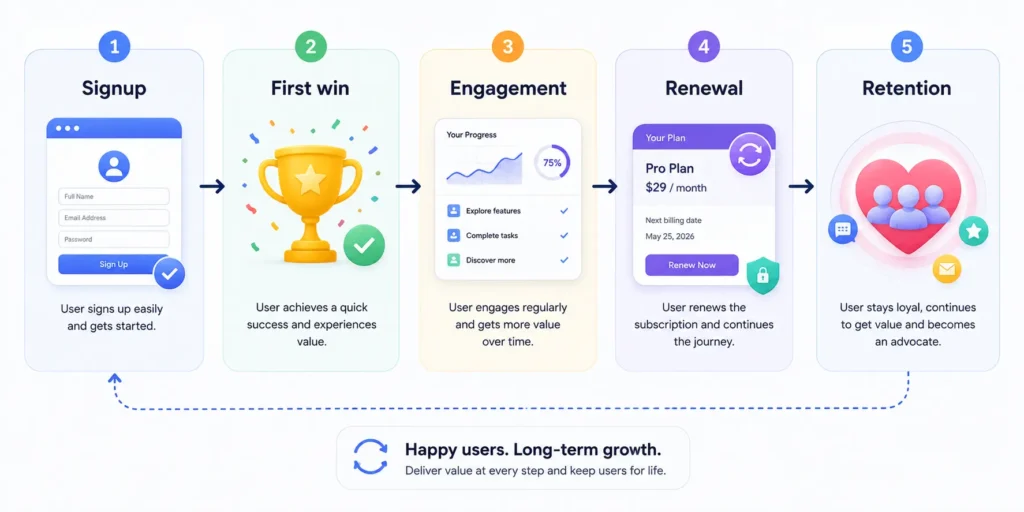
Step 7: Build the Retention System Before Launch
Acquiring a customer once is not the same as keeping them. Retention should be designed before the first paid campaign begins.
| Moment | Retention action |
| Immediately after signup | Deliver a clear welcome and next step |
| First session | Help the member reach one quick win |
| First 7 days | Send useful guidance and highlight core features |
| Ongoing | Create a predictable content, product or service rhythm |
| Before renewal | Remind customers of value received |
| Cancellation | Offer a simple path, collect optional feedback, and protect trust |
For example, a paid SEO resource membership could welcome new members with a 10-minute setup checklist, recommend three resources based on their role, send a weekly research update, and show saved progress in the dashboard. The goal is not to trap people into staying. It is to make the continuing value obvious.
Turn the Idea Into an MVP
If you already know your audience and offer, the next step is usually an MVP not a giant platform. You can use your Upwork profiles for projects requiring discovery, custom development, membership setup, payment integration, or SaaS architecture, and your Fiverr profile for smaller fixed-scope tasks such as payment gateway integration, membership configuration, or landing-page development. Keep each CTA focused on the problem the reader is trying to solve.
Step 8: Optimize Your Subscription Website for Search and AI Discovery
Google and AI assistants increasingly reward pages that answer specific questions clearly, demonstrate real expertise, and provide useful original structure. For this page, that means writing for people first while making important answers easy for machines to understand.
- Use a descriptive title and a clear first paragraph that directly defines the topic.
- Organize the page around genuine questions and tasks, not repeated keywords.
- Add original examples, checklists, comparison tables, and decision criteria.
- Show who created the content and why they have relevant experience.
- Support important factual claims with trustworthy sources where appropriate.
- Use clear headings, internal links, descriptive image alt text, and relevant structured data.
- Keep important advice accessible in HTML rather than hiding everything inside images.
For AI Overview and AI chat assistants such as ChatGPT, Claude, Gemini, and Perplexity, there is no reliable trick that guarantees citation. The stronger approach is to publish a page that is easy to retrieve and quote: direct answers, specific terminology, transparent authorship, crawlable structure, and genuinely useful original information.
Learn About: Best CMS for Startups in 2026
Common Mistakes When Building a Subscription Website
Building too much before validating demand
A large custom platform does not fix a weak offer. Test the value proposition before investing heavily.
Making the subscription value vague
“Exclusive access” is not a benefit by itself. Explain what the customer receives and what outcome it supports.
Treating checkout as the end of the customer journey
The first days after signup are often where the customer decides whether the subscription was worth it.
Ignoring failed payments
Payment failures are part of recurring billing. Use a system that supports appropriate retries, notifications, and customer payment updates.
Making cancellation unnecessarily difficult
Short-term friction can damage trust. A transparent cancellation experience may also provide better feedback about why customers leave.
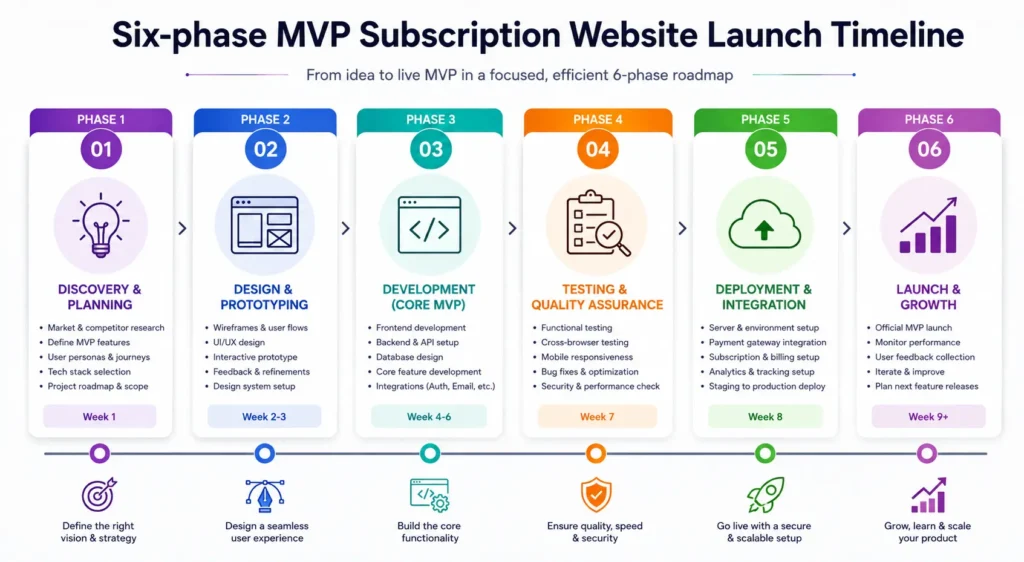
A Simple Subscription Website Launch Plan
| Phase | Primary goal | Key output |
| Week 1 | Validate audience and offer | Positioning + founding offer |
| Week 2 | Define MVP and pricing | Feature scope + pricing structure |
| Week 3 | Build core experience | Pages, authentication and access rules |
| Week 4 | Connect recurring billing | Checkout + lifecycle automation |
| Week 5 | Test the customer journey | QA across signup, payment and cancellation |
| Week 6 | Launch and measure | First acquisition campaign + retention tracking |
The timeline will vary based on complexity. A simple content membership can move faster, while a custom SaaS subscription platform may require significantly more planning and development.
Learn About: Web App vs Website
FAQ: Building a Subscription Website
Ans. To build a subscription website, first define the recurring value you will provide, choose a pricing model, select a platform or development approach, create secure recurring billing, add account and access controls, and test the complete customer journey before launch. Start with an MVP and improve it using real customer feedback.
Ans. At minimum, you need a clear offer, pricing plans, a website, user accounts, recurring payment processing, access control for paid content or features, and a way for customers to manage or cancel their subscriptions. You also need clear policies and a support process.
Ans. The cost depends on whether you use an existing platform or build custom functionality. A basic membership site can have relatively low software and setup costs, while a custom subscription platform can require a larger development budget. The best approach is to define the minimum features needed for launch before estimating the project.
Ans. The best payment setup depends on your country, customers, currencies, and platform. Choose a reputable provider that supports recurring billing, payment updates, subscription changes, failed-payment recovery, and secure checkout. Make sure the provider and your implementation fit your legal and tax requirements.
Ans. Reduce churn by helping customers experience value quickly, communicating regularly, improving the product or content based on feedback, making billing issues easy to resolve, and studying why customers cancel. Retention improves when the subscription consistently solves an ongoing problem.
Conclusion: Build for Ongoing Value, Not Just Recurring Payments
The best subscription websites are not simply websites with a monthly checkout button. They are systems designed around an ongoing customer need. Start by validating the problem, define a clear recurring value proposition, keep the first version focused, make billing and access reliable, and build retention into the experience from day one.
If your idea requires custom membership logic, recurring payment integration, a SaaS dashboard, or a scalable subscription architecture, the next logical step is to define the MVP before development begins. Link here to your most relevant service page or hire/contact CTA, and use your Upwork or Fiverr profiles as alternative paths for readers who prefer project-based help.
Have a subscription website idea but need help turning it into a working product?
Start with a clear MVP scope, then choose the right route: a focused project through Fiverr, a larger development engagement through Upwork, or a direct consultation through your website. The goal is not to build the biggest platform on day one it is to launch a subscription experience customers have a reason to keep paying for.