Start Accepting Payments Without Friction
Want to turn visitors into paying customers instantly? A seamless payment experience is the difference between lost carts and real revenue. In this guide, you’ll learn exactly how to integrate a payment system on your website, which gateways to choose, what it costs, and how to avoid common mistakes based on real-world implementation experience.
For Learn About: How to Build a Website That Converts Visitors Into Customers, Click Here!
👉 Need help integrating payments on your website?
I offer done-for-you payment integrations on Upwork & Fiverr, secure, fast, and conversion-focused. Message me to get started.
What Does It Mean to Integrate a Payment System?
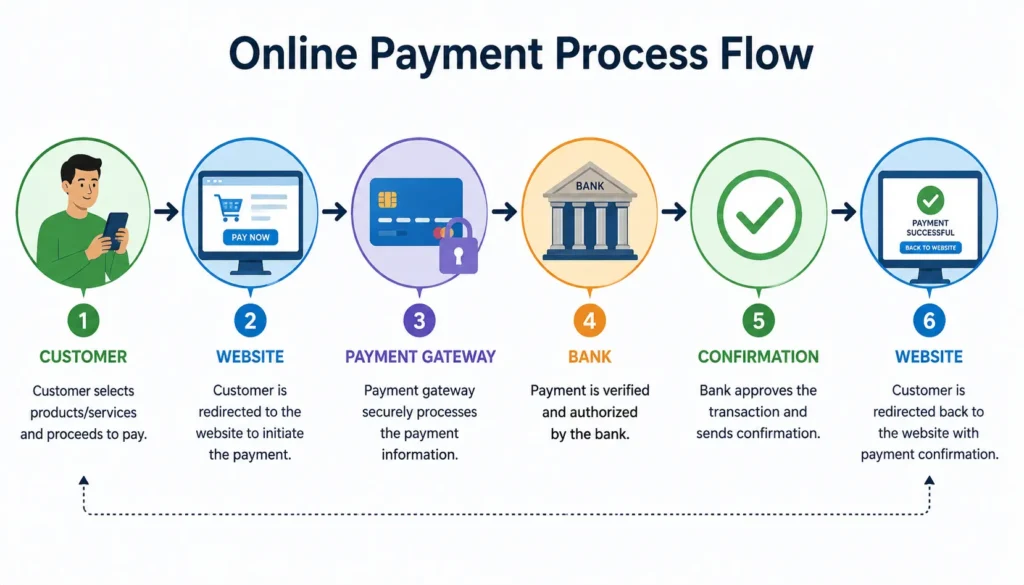
Integrating a payment system means enabling your website to accept, process, and confirm payments online securely.
Real-world example:
- A customer clicks “Buy Now”
- Enter card or wallet details
- The payment gateway processes it
- You receive confirmation instantly
For Learn About: How to Plan a Website Rebuild, Click Here!
Types of Payment Systems You Can Integrate
1. Payment Gateways
- Stripe
- PayPal
- Authorize.net
👉 Best for: Global businesses
2. Local Payment Methods (Pakistan Focus)
- JazzCash
- Easypaisa
👉 Best for: Local audience trust & higher conversions
3. Direct Bank Integration
- Requires a merchant account
👉 Best for: Large enterprises
For Learn About: Build a Website With AI in One Day, Click Here!

Step-by-Step: How to Integrate Payment System in Website
Step 1: Choose the Right Payment Gateway
| Best For | Best For | Fees | Ease |
|---|---|---|---|
| Stripe | Developers, SaaS | Medium | Easy |
| PayPal | Freelancers, global | High | Very Easy |
| JazzCash | Pakistan local | Low | Medium |
👉 Tip: Choose based on target audience + currency + business model
Step 2: Create Merchant Account
- Sign up with the gateway
- Verify business details
- Connect bank account
Step 3: Get API Keys
Most gateways provide:
- Publishable Key
- Secret Key
These connect your website to the payment provider.
Step 4: Integrate Payment API
Example Flow:
- Add a checkout button
- Connect API
- Process transaction
- Handle response
Step 5: Enable Secure Checkout
- SSL certificate (HTTPS)
- Tokenization
- PCI compliance
Step 6: Test Payments
Always test using:
- Sandbox environment
- Dummy cards
Step 7: Go Live
Switch from test mode → live mode
Start accepting real payments
For Learn About: Ecommerce Website Integration with ERP, Click Here!
Payment Integration Architecture
Security Best Practices
- Use HTTPS (non-negotiable)
- Enable 2FA for admin access
- Never store card details directly
- Use trusted gateways only
👉 Google prioritizes secure websites, which impacts rankings.
Common Mistakes to Avoid
- ❌ Choosing the wrong payment gateway
- ❌ Ignoring mobile checkout UX
- ❌ No fallback payment method
- ❌ Slow checkout process
- ❌ Hidden fees
Cost of Payment Integration (2026)
| Cost Type | Range |
|---|---|
| Setup Fee | $0 – $500 |
| Transaction Fee | 1.5% – 3.5% |
| Developer Cost | $50 – $500 |
👉 Tip: SaaS tools like Stripe reduce dev costs significantly.
Conversion Optimization Tips
- One-click checkout
- Multiple payment options
- Trust badges
- Fast loading speed
- Simple forms
👉 Small UX changes can increase conversions by 20–40%
Want a high-converting payment system that actually boosts sales?
Hire me on Upwork or Fiverr for expert integration, optimization, and security setup.
Advanced Features You Can Add
- Subscription billing (SaaS)
- Multi-currency payments
- One-click checkout
- Fraud detection
- Invoice automation
Real Problem (And Fix)
Problem: Users abandon checkout
Reason: Complicated payment process
Solution:
- Reduce steps
- Add guest checkout
- Show trust signals
For Learn About: Headless CMS for Ecommerce, Click Here!
FAQ
Choose a payment gateway, create an account, get API keys, connect it to your website, test transactions, and go live securely.
Stripe is best for developers and scalability, PayPal is easiest to use and local gateways like JazzCash work best for Pakistan.
Yes, if you use HTTPS, PCI-compliant gateways, and secure APIs. Avoid storing sensitive card data directly.
It ranges from $0 to $500 setup cost, plus transaction fees between 1.5% to 3.5%.
Yes, using global gateways like Stripe or PayPal with multi-currency support.
Expert Insight
From real-world implementations:
The biggest mistake businesses make is focusing only on adding payments, not optimizing the payment experience.
A slow or confusing checkout kills conversions even if traffic is high.
👉 Ready to integrate a secure, high-converting payment system?
I help businesses set up, optimize, and scale payment systems via Upwork & Fiverr. Let’s turn your website into a revenue machine.
✅ Conclusion
Integrating a payment system in your website is no longer optional it’s essential.
By choosing the right gateway, ensuring security, and optimizing user experience, you can:
- Increase conversions
- Build trust
- Scale globally
Take action today—and start accepting payments the smart way.
For Learn About: Convert WordPress to React, Click Here!